
Amazon FBA Reconciliation Checklist for 2025


Key Updates for 2025:
Reimbursement Changes: Amazon now calculates reimbursements based on manufacturing costs, not selling prices - this means lower payouts.
Shorter Claim Windows:
Lost/Damaged Items: 60 days
Customer Returns: 60-120 days
Transit-Related Claims: 15-75 days
Stricter Documentation: Stronger records are required for claims.
5 Steps to Reconcile Effectively:
Collect Data: Extract reports like Settlement, Transaction View, and Inventory Adjustments from Seller Central.
Check Inventory: Review lost/damaged items, inbound shipping errors, and customer returns for discrepancies.
Analyze Payments: Verify deposits, assess fees, and track refunds or chargebacks.
File Reimbursement Claims: Use tools like Refunzo to automate claims for lost inventory, overcharged fees, and mishandled returns.
Improve Processes: Perform monthly audits, use accounting software, and maintain detailed records.
Quick Comparison of Tools:
Tool | Best For | Monthly Cost |
|---|---|---|
QuickBooks | Small-medium sellers | $99 |
Xero | International sellers | $47 |
A2X | Automated categorization | Varies |
Take Action: Regular reconciliation can recover up to 14% of your profits. Use automation tools, monitor reports monthly, and file claims promptly to protect your revenue.
Step 1: Data Collection
Key Seller Central Reports
To reconcile your Amazon transactions accurately, start by extracting the necessary reports from Amazon Seller Central. Here's a quick guide to the most important ones:
Report Type | Purpose | Location in Seller Central |
|---|---|---|
Date Range Settlement | Provides a detailed account activity breakdown | Reports > Payments > Date Range Reports |
Transaction View | Offers order-level payment details | Reports > Payments > Transaction View |
Inventory Adjustments | Tracks inventory changes | Reports > Inventory > Inventory Adjustments |
FBA Returns | Monitors customer returns | Reports > Returns > FBA Returns |
Make sure to download these reports within the 24-hour settlement window. This allows you to align transaction records with your bank deposits. Once collected, use accounting software to integrate and organize the data efficiently.
Setting Up Accounting Software
Manual data entry is a common source of reconciliation mistakes - even in 2025. Avoid these errors by using software that simplifies and automates the process. Here are some popular options:
Software | Best For | Monthly Cost |
|---|---|---|
QuickBooks Online Plus | Small to medium-sized sellers | $99 |
Xero Growing | Sellers operating internationally | $47 |
A2X | Automated categorization | Varies by volume |
"For connecting Amazon seller data with our accounting software, we use A2X. I can never understand why a client would connect a solution that submits individual transactions (that flood the general ledger) or enter data manually. A2X is seamless, allows for accrual accounting, and is incredibly accurate."
Integrating the right software ensures your data is organized and ready for streamlined reconciliation.
Organizing Historical Data
Getting your past data in order can help resolve discrepancies faster and strengthen future reimbursement claims. Here’s how to do it effectively:
Set Up a Structured Filing System
Organize settlement periods systematically to make it easier to analyze past discrepancies and communicate with Amazon support.
Schedule Regular Reviews
Conduct monthly reconciliation sessions to catch and fix issues promptly, keeping your financial records accurate.
Keep Detailed Documentation
Maintain thorough records of all reconciliation activities. This includes screenshots of discrepancies, case numbers, and any communication with Amazon support.
Refunzo’s free reconciliation service can help by automating data organization. With its 21-point checks, it identifies recurring issues and strengthens your reimbursement claims.
Amazon FBA Reimbursement Policy Changes for 2025: What Sellers Need to Know
Step 2: FBA Inventory Check
Once your data is organized, it's time to verify your inventory records for accuracy. Regular checks help ensure your FBA data is correct and can reveal opportunities for reimbursements within Amazon's intricate system.
Lost and Damaged Items
Inventory loss and damage are common issues with Amazon FBA. To stay on top of these, review these key reports:
Report Type | Purpose | Update Frequency |
|---|---|---|
Inventory Adjustments | Tracks lost or damaged items | Daily |
Reconciliation Report | Compares expected vs. actual stock | Weekly |
Pay close attention to items listed as "Lost in Warehouse" or "Damaged by Amazon." These are often eligible for reimbursement under Amazon's FBA policies.
"Refunzo continuously audits your Amazon FBA transactions, identifying FBA discrepancies and filing claims for reimbursement on your behalf."
After reviewing these reports, don't forget to check inbound shipping records for additional errors.
Inbound Shipping Errors
Shipping discrepancies can happen, so it's essential to address them promptly. Here's how:
Check Receiving Status: Go to Inventory > Manage FBA Shipments in Seller Central. Confirm that the quantities you shipped match what Amazon received. If there are differences, document them right away.
Submit Research Requests: For any discrepancies, select "Missing – Please Research" or "Unexpected – Please Research" in Seller Central. Include box contents and product codes to support your claim.
Track Resolution Timeline: Amazon typically resolves these cases within 2 to 60 days. Set a reminder to follow up if you haven't heard back within 45 days.
Once you've handled shipping discrepancies, shift your attention to returns and disposal tracking.
Returns and Disposal Tracking
Monitoring returns is key to keeping your inventory accurate and securing reimbursements. Use Amazon's Return Insights tool to spot trends and address any recurring issues.
Return Category | Action Required | Documentation Needed |
|---|---|---|
Customer Returns | Inspect the condition upon receipt | Return tracking numbers |
Warehouse Damage | Request inspection photos | Original shipment details |
Disposal Orders | Confirm completion status | Disposal authorization |
To catch return-related discrepancies, consider tools like Refunzo's free 21-point reconciliation system. Keeping thorough documentation is crucial.
"Amazon FBA returns are an unavoidable aspect of doing business on the world's largest online marketplace. Effectively managing FBA Amazon returns is not just about processing refunds; it's a critical component of maintaining profitability, optimizing inventory, and ensuring customer satisfaction." - Paulami Karmakar, Amazon Content Expert, SalesDuo
You might also want to look into Amazon's FBA Grade and Resell Program. It allows you to recover value from returned items that meet specific condition criteria.
Step 3: Payment Analysis
Once your inventory is confirmed, the next step is to review financial transactions. This ensures you're receiving the correct payments and not getting overcharged on fees. Catching errors early can help you address discrepancies and recover potential reimbursement opportunities.
Deposit Verification
To confirm that Amazon deposits align with your sales, download the Settlement Report and Transaction Report from Seller Central. The Settlement Report includes detailed transaction data such as captures, refunds, transfers, and reserve charges, which you can use to reconcile orders with your bank records. Keep in mind that Amazon's reserve policy may temporarily hold funds. If a deposit hasn't shown up in your account after 3–5 business days, use the ACH/Trace ID in Seller Central to contact your bank. Once deposits are verified, move on to reviewing fee structures.
Fee Assessment
Carefully examine fees to avoid unnecessary charges.
"Since I started paying attention to Bindwise alerts 4 months ago I noticed wrong dims were costing me at least $4,000 a month." – Manta_Ray_Bay store
Dimension Changes: Incorrect product dimensions can lead to higher fees. For instance, a "Garlic Press Stainless Steel" (B01YYQIXXX) saw its fee jump from $5.11 to $8.91.
Inconsistent Fees: In another case, four products in different colors had varying FBA fees - one was charged $4.38, while the others were $4.55.
If you notice any discrepancies, request a 'Cubiscan' from Amazon to verify your product measurements.
Refund and Chargeback Review
Keep an eye on refunds and chargebacks to minimize losses. Amazon sends email notifications for chargebacks, which usually include details like the seller order ID, order reference ID, transaction date, disputed amount, and dispute reason code.
To dispute a chargeback, gather supporting evidence such as transaction details, product descriptions, proof of delivery, and customer communication records. For added convenience, tools like Refunzo's free 21-point reconciliation system can automate the process of identifying refund discrepancies and tracking potential reimbursements.
Step 4: Reimbursement Claims
Once your inventory and payments are confirmed, it’s time to focus on recovering any losses.
2025 Reimbursement Types
Starting in March 2025, reimbursements are calculated based on manufacturing costs, which can lower payouts for high-margin items.
Claim Category | Processing Type | Time Limit |
|---|---|---|
Lost Inventory | Automatic | 60 days |
Damaged Inventory | Automatic | 60 days |
Customer Returns | Automatic | 60 days |
Removal Claims | Manual | 60 days |
Mishandled Returns | Manual | 60 days |
Overcharged Fees | Manual | 60 days |
You have a 60-day window to file claims, so staying on top of reconciliation is crucial.
To make this process easier, automated tools can help identify reimbursement opportunities.
Refunzo Automation Tools
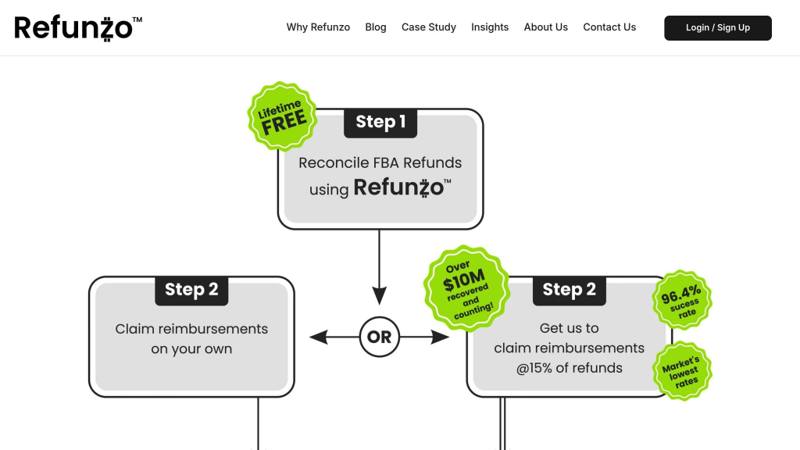
Refunzo simplifies the reimbursement process by automatically flagging eligible claims for lost inventory, fee errors, and more.
"Our goal with Refunzo is to empower sellers by simplifying a tedious process. Sellers connect their account, and the platform identifies missed reimbursements, giving them a clear picture of what's owed."
– Patel, CEO at eStore Factory
Refunzo provides two options:
Free Reconciliation: Automated checks and detailed reports to help you track discrepancies.
Full-Service Claims: Optional claim submission service for 15% of refunded amounts, capped at $5,000.
Claim Submission Steps
You can file claims directly through Seller Central by following these steps:
Document Collection
Gather necessary records such as shipping manifests, delivery confirmations, inventory logs, damage photos, and dimension/weight details.
Claim Filing
Head to the Help section in Seller Central, create a case, and attach your documentation. Be as specific as possible - include dates, quantities, and affected SKUs.
Follow-up Protocol
Use Seller Central’s case management system to track your claims. Set reminders to check the status regularly. Experts estimate that up to 40% of reimbursements go unclaimed due to poor follow-up.
Amazon calculates reimbursement values using the median prices from the last 18 months, along with your current listing price. Keeping detailed price records will strengthen your claims.
Step 5: Process Improvement
Building on accurate data collection and detailed payment analysis, improving your processes regularly helps protect your profits.
Monthly Reconciliation Tasks
Here's a suggested monthly workflow to keep everything in check:
Week 1: Initial Review
Start by downloading and reviewing payment settlement reports, inventory adjustments, return/refund transactions, and fee calculations.
Week 2: Deep Dive Analysis
Cross-check data sources to spot discrepancies in payments, inventory movement, and how returns are handled.
Week 3: Issue Resolution
Document any issues you find, file claims as needed, and follow up on unresolved cases.
Week 4: Process Optimization
Update tracking tools, fine-tune automated alerts, and document any new patterns or recurring issues.
Software Options
Choosing the right software can make this process much smoother. Here's a quick comparison of popular tools:
Software | Best For | Key Features | Monthly Cost |
|---|---|---|---|
Webgility | Multi-channel sellers | AI-powered automation | $49 |
Bookkeep | High-volume transactions | Daily journal entries | $50 |
Finaloop | Growing businesses | Real-time bookkeeping | $59 |
Xero + Link My Books | International sellers | Multi-currency support | Varies |
"QuickBooks Online is perfectly suited for an Amazon seller… it has the right features, usability, and allows for seamless communication between sellers and their accounting partners." - Teresa Slack, founder of Financly
The right software is a great start, but keeping accurate records is just as important.
Record Keeping Guidelines
Digital Documentation
Save Amazon-related emails in cloud storage.
Keep screenshots of Seller Central cases.
Archive shipping manifests.
Store monthly performance reports.
Data Organization
Use consistent file naming conventions.
Create folders for each reconciliation period.
Maintain backup copies of all records.
Set up automated backup systems.
Retention Schedule
Hold onto primary records for 7 years.
Keep inventory-related documents for 18 months.
Retain pricing history for reimbursement claims.
Archive case correspondence for 24 months.
Using tools like barcode scanners and RFID tracking can help minimize errors and improve precision. Regularly auditing reimbursements for shipments and stored inventory ensures you catch discrepancies early, maximizing your recovery opportunities.
Conclusion: Improving FBA Profits
FBA reconciliation plays a crucial role in maintaining profitability, as sellers can lose up to 3% of their annual revenue due to unresolved issues. With Amazon's updated 2025 FBA reimbursement policy, effective March 10, now basing compensation on manufacturing costs, accurate reconciliation has become even more critical.
Data reveals that about 40% of reimbursements result from inbound shipment errors, and for some sellers, these reimbursements make up as much as 14% of their profits. These numbers highlight the importance of precise reconciliation practices.
Automation tools are now essential for identifying missed reimbursements. Platforms like Refunzo have changed the game, with users recovering significant amounts through features like its 21-point reconciliation system. As Doug Joyce shared:
"Refunzo is great. Have found me 10's of thousands of dollars. Professional and efficient"
To maximize FBA profits, consider these strategies:
Stay Updated on Policies: Keep track of Amazon's reimbursement policy updates.
Use Automation Tools: Implement tools to minimize manual errors and save time.
Maintain Detailed Records: Document all transactions thoroughly.
Perform Regular Audits: Conduct monthly checks to catch discrepancies early.
Act Promptly: File reimbursement claims quickly, backed by solid evidence.
Building a reliable reconciliation process not only resolves current issues but also helps protect your profits moving forward.