
5 Ways to Maximize Your Amazon FBA Reimbursement Claims


For Amazon FBA sellers, lost or damaged inventory can silently eat into profits - costing up to 3% of annual revenue. With stricter reimbursement rules starting March 2025 (claim windows reduced to 60 days), staying organized and proactive is critical. Here’s how to recover lost funds:
Check Inventory Monthly: Regularly review reports to catch errors Amazon might miss (up to 60% of eligible claims go unnoticed).
Know Refund Rules: Understand updated policies, including shorter timelines and changes to reimbursement calculations.
Use Software: Tools like Refunzo automate claim tracking and recovery.
Keep Records: Maintain clear documentation (e.g., invoices, tracking details) to support claims.
File on Time: Submit claims within deadlines - 60 days for most issues, 90 days for fee disputes.
Amazon’s system isn’t perfect. But with these strategies, you can reclaim thousands of dollars in lost revenue and protect your bottom line.
The FASTEST Way to Claim Amazon FBA Reimbursements
1. Check Inventory Records Monthly
Review your inventory records every month to catch reimbursement opportunities. Reports indicate Amazon's proactive reimbursement program may overlook up to 40% of potential refunds, with some sellers missing as much as 60% of eligible claims. By keeping a close eye on your inventory, you can recover funds that might otherwise slip through the cracks. This regular review complements the claim tracking strategies outlined in this guide. Below is a table summarizing common inventory discrepancies that qualify for reimbursements.
Common Missing and Damaged Item Types
Amazon's FBA warehouses process millions of items daily, which naturally leads to some errors. Here are the most frequent inventory issues eligible for reimbursement:
Issue Type | Description | Claim Process |
|---|---|---|
Lost Inventory | Items misplaced in Amazon's fulfillment centers | Automatic |
Damaged Inventory | Products damaged during handling or storage | Automatic |
Customer Returns | Items mishandled after being returned | Automatic |
Missing Inbounds | Discrepancies in received shipment quantities | Manual only |
Lost In Transit | Items lost during shipping | Manual only |
On average, discrepancies in products sent to FBA range from 1% to 3% of total inventory. Even small errors can impact your bottom line.
Make sure to download your Inventory Adjustments Report at least every 90 days. Pay close attention to customer returns - if a returned item hasn’t been added back to your inventory within 45 days, reach out to Amazon support.
Inventory Tracking Software Options
To make the process easier, consider using tools designed for inventory tracking:
Refunzo: This tool helps reconcile claims related to shipment discrepancies, inventory mismatches, payment errors, fee miscalculations, and refunds.
Inventory planning: Forecasting stock needs and order timing keeps storage fees down and reduces the removals that trigger claims.
Pair manual reviews of your Inventory Adjustments Report with these automated tools. Set reminders to regularly update your inventory records and shipment details.
2. Know Amazon's Refund Rules
If you're an Amazon FBA seller, understanding their reimbursement policies is a must. Recent updates have changed how and when you can file claims, as well as how reimbursements are calculated. Knowing these details can help you recover every dollar you're entitled to.
When You Can Request Money Back
Starting October 23, 2024, Amazon is updating its reimbursement windows. Here's a quick breakdown of the current timelines:
Issue Type | Time Window | Requirements |
|---|---|---|
Fulfillment Center Claims | 60 days | Lost or damaged items in the warehouse |
Customer Return Claims | 60–120 days | Items not properly processed |
Removal Claims (Transit) | 15–75 days | Items lost during removal |
Other Removal Issues | 60 days post-delivery | Damaged or incorrect removals |
One major change is how Amazon calculates reimbursements. Instead of basing payments on selling prices, they now use manufacturing costs. This shift could lower reimbursement amounts, especially for products with high profit margins.
Track Policy Updates
Amazon's policies are constantly changing, and staying updated can make a big difference. Here are some key areas to focus on:
Manufacturing Cost Adjustments: Check the new portal for cost estimates and ensure your manufacturing data is accurate.
Automated Claims: While Amazon now automates some claims, up to 40% of eligible reimbursements still go unclaimed. Keep an eye on your account to avoid missing out.
Marketplace-Specific Rules: Deadlines can vary by region. For example, warehouse claims in the UK will be limited to 60 days starting January 9, 2025. If you sell internationally, double-check the rules for each marketplace.
3. Use Software to Find Claims
After setting up regular inventory tracking and updating your policies, using specialized software can make claim recovery much easier. While manual tracking can be time-consuming and prone to mistakes, these tools are designed to identify and recover reimbursements efficiently.
Refunzo Features and Pricing
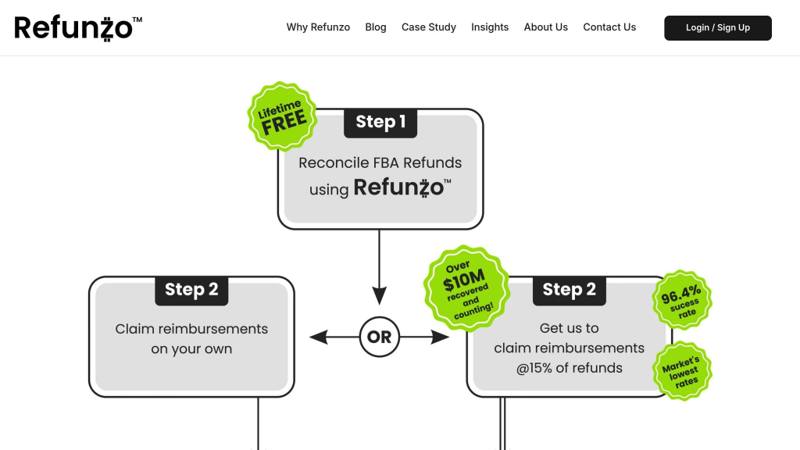
Refunzo offers a free lifetime FBA reconciliation service with 21 automated checks to identify reimbursement opportunities. These checks cover areas like lost or damaged inventory, return discrepancies, fee overcharges, and misclassified storage fees. If you choose their optional claim-filing service, they charge 15% of the refund (capped at $5,000), and you only pay if the reimbursement is successful.
Comparing FBA Reimbursement Tools
Here’s a quick look at some popular FBA reimbursement tools:
Tool | Key Features | Monthly Cost | Commission |
|---|---|---|---|
SellerBoard | Lost inventory tracking | $15.00 | None |
Refund Pad | Report-based claim identification | $19.00 | None |
When choosing a tool, look for features like:
AI-powered detection for precise claim identification
Real-time analytics and custom reporting
Case management for less obvious claim categories
Integration with Amazon seller tools
Support for more complex claims
Pick a tool that fits your sales volume and claim management needs to get the most out of your reimbursements.
4. Keep Clear Records
Good documentation is the backbone of successful claims. Missing or incomplete paperwork often leads to rejected claims, so staying organized is key. Clear records also work hand-in-hand with automated claim tracking and manual reviews.
Required Claim Documents
Amazon requires different documents depending on the type of reimbursement claim you're filing. Here's a quick reference:
Claim Type | Required Documentation |
|---|---|
Lost/Damaged Inventory | • Proof of Delivery (POD) |
Fee Disputes | • Product dimension records |
Inventory Discrepancies | • Shipment tracking details |
Important: File inventory claims within 60 days and fee disputes within 90 days.
Tips for Storing Documents
Here are some strategies to keep your paperwork organized and accessible:
Go Digital and Stay Organized
Set up folders by year, month, claim type (e.g., fees, inventory, damages), and claim status (e.g., pending, approved, rejected).
Back It Up
Save your files in at least two locations:
Cloud storage like Google Drive or Dropbox
A local backup on your computer
For critical documents, use an external hard drive too.
Use a Standard Naming System
Create file names that make it easy to find what you need. Use this format:
YYYY-MM-DD_ClaimType_OrderID_Status.
Example:2025-02-27_DamagedInventory_B08X123_Pending.Review Weekly
Dedicate time each week to:
Go through the inventory reports
Update claim files
Check claim statuses
Submit any new claims before deadlines hit.
5. Submit Claims On Time
Filing claims within the required deadlines is crucial to ensure you receive reimbursements. Each type of claim has specific timeframes, and missing these can mean losing out on eligible refunds.
How to File a Claim
The process for filing a claim depends on the type of reimbursement you're pursuing. Here's a breakdown of common scenarios:
Inventory Discrepancies
Allow Amazon 30 days to handle automatic reimbursements before taking action. If no resolution occurs, you have up to 60 days from the incident date to file your claim.
Inbound Shipment Issues
For shipment-related problems, wait until day 25 to file your claim if discrepancies persist. Be sure to submit it within 9 months.
Customer Return Problems
Claims for customer returns should be filed between 60 and 120 days after a refund or replacement is processed.
Fee Disputes
Dispute claims for incorrect fees within 90 days of the charge. Regularly review your fee reports to catch discrepancies early.
Once you've filed, double-check your claim to avoid errors that could delay or complicate the process.
Common Filing Errors to Avoid
Error Type | Impact | Solution |
|---|---|---|
Filing Too Early | Automatic rejection | Wait at least 30 days for Amazon's system to attempt reimbursement. |
Missing Documentation | Delayed processing | Provide all necessary documents, like invoices and reconciliation reports. |
Duplicate Claims | Account warnings | Confirm no existing claims are open before submitting a new one. |
Incorrect Category | Processing delays | Choose the correct claim type in Seller Central. |
Did you know that inbound shipment errors account for nearly 40% of reimbursements? Keeping a close eye on these is essential. To boost your success rate, try these tips:
Track Everything: Log every detail of your FBA process, from shipments to returns.
Set Reminders: Use calendar alerts to stay on top of claim deadlines.
Review Reports Regularly: Check Seller Central weekly to spot issues early.
Organize Evidence: Keep digital copies of all supporting documents by claim type.
For sellers managing high volumes, tools like Refunzo’s free reconciliation service can help automate tracking and ensure you meet deadlines. Staying organized and submitting claims on time are key to maximizing reimbursements.
Conclusion
Amazon manages inventory with an impressive accuracy rate of 97% to 99%. However, even the small 1–3% error margin can result in $10,000 to $30,000 in recoveries for a seller with $1M in sales.
To maximize these recoveries, focus on the five key strategies discussed earlier: conducting regular inventory checks, understanding refund policies, using software tools, keeping detailed records, and submitting claims promptly. Experts stress that reimbursements are an essential part of a seller's financial strategy, helping to protect profit margins and ensure smooth operations. These practices can simplify the process of filing and recovering claims.
Software solutions like Refunzo can make claim reconciliation easier. As David Cummings shared:
"We have been using Refunzo for about 4 years and we have been very pleased with their service. They are extremely easy to work with and charge less than most refunds services around while getting more back in refunds than our last service."