
Amazon FBA Inventory Adjustments: Key Reports


Managing your Amazon FBA inventory is easier when you understand key reports that track stock adjustments. These reports help you identify discrepancies, recover lost funds, and maintain accurate records. Here's what you need to know:
Why It Matters: Inventory reports help you track stock movements, detect damaged or lost items, and file claims for reimbursements.
Common Adjustments: Be aware of inventory losses, damages, customer returns, and system corrections.
Essential Tools:
FBA Inventory Ledger: Tracks all inventory activity with timestamps, quantities, and reasons for adjustments.
Reconciliation Report: Flags discrepancies, monitors stock conditions, and helps document claims.
Reimbursement Claims: File claims for lost, damaged, or misallocated inventory with proper documentation.
Pro Tip: Use tools like Refunzo to automate tracking and claims, saving time and recovering funds effectively.
Mastering FBA Inventory Reconciliation | Amazon Legends ...
Understanding the FBA Inventory Ledger
The FBA Inventory Ledger is your go-to tool for keeping tabs on all inventory activity within Amazon's fulfillment centers. It offers a detailed look at stock movements, adjustments, and transactions that impact your inventory levels.
About the Inventory Ledger
Think of the Inventory Ledger as the history book for your FBA inventory. It tracks:
Shipments received at fulfillment centers
Customer orders and returns
Transfers between warehouses
Adjustments, disposals, and corrections to stock
Each entry includes timestamps, quantities, and disposition codes, making it easy to follow inventory changes.
Main Report Elements
The ledger is packed with essential details to help you monitor your stock:
Report Element | Description | Usage |
|---|---|---|
Transaction Date | Date and time of inventory activity | Helps you track events in order |
Reference ID | Unique ID for each transaction | Links adjustments to specific actions |
Disposition | Current status of inventory items | Shows the condition and location of items |
Quantity | Number of units involved | Tracks how stock levels change |
Reason Code | Explains why adjustments were made | Identifies causes of discrepancies |
These elements make it easier to reconcile and manage your inventory.
Reconciliation Methods
Use the information in the ledger to resolve discrepancies with these steps:
Daily Checks: Review transactions daily to spot anything unusual.
Cross-Check Reports: Compare ledger entries with removal, return, and reimbursement reports.
Investigate Issues: Note transaction IDs, calculate differences, and gather evidence for claims.
Staying on top of your ledger and addressing irregularities quickly will help maintain accurate inventory records.
Using the Reconciliation Report
The Reconciliation Report is your go-to resource for spotting inventory issues and creating strong reimbursement claims.
Report Functions
This report provides several features to help sellers keep their inventory in check:
Function | Purpose | Benefit |
|---|---|---|
Discrepancy Detection | Flag mismatches between expected and actual inventory | Identifies possible reimbursement claims |
Transaction History | Displays a timeline of inventory movements | Tracks stock changes accurately |
Status Tracking | Monitors item condition and location | Pinpoints damaged or lost inventory |
Claims Documentation | Supplies evidence for reimbursement requests | Strengthens your case for Amazon claims |
By using this tracking system, you can uncover inventory issues that might qualify for reimbursement, such as:
Items lost during receiving
Damaged stock in fulfillment centers
Understanding these features allows you to use the report effectively and uncover potential claims.
Getting Started
To access the report, go to Reports > Inventory, choose 'Reconciliation Report,' set your desired date range and inventory categories, and download the file.
For best results, review the report weekly, log any issues, track your claims, and keep detailed records of inventory movements.
If you want to save time, tools like Refunzo can automatically process the data. Refunzo’s system analyzes your inventory across 20+ criteria, offering detailed insights to help you identify reimbursement opportunities more efficiently.
Getting FBA Reimbursements
Once you've identified discrepancies in your inventory reports, the next step is to recover your money through reimbursements. Addressing these discrepancies helps protect your profits. With accurate tracking in place, follow these steps to ensure you get back any funds owed.
Reimbursement Types
Amazon provides reimbursements for specific inventory issues:
Issue Type | Description |
|---|---|
Lost Inventory | Items that went missing during receiving or storage |
Damaged Inventory/Returns | Products damaged during shipment, in fulfillment centers, or returned damaged |
Misallocated Inventory | Stock that was incorrectly moved or recorded |
Each type of claim requires proper documentation, such as shipping manifests, condition notes, photos, and inventory records.
Filing Claims
To file a claim, follow these steps:
Document the Issue: Gather evidence from your reports.
Calculate Losses: Assess the value of the affected inventory.
Submit the Claim: Include dates, SKUs, and quantities.
Follow Up: Track your claim's progress and respond to any requests for additional information.
Automated tools can make this process easier. That’s where Refunzo comes in.
Using Refunzo for Claims
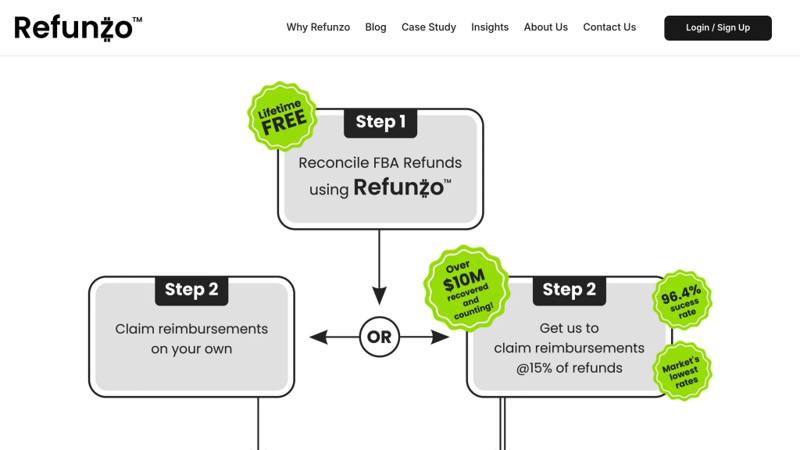
Refunzo simplifies the reimbursement process with automated reconciliation checks. Their system reviews your account against over 20 criteria to identify potential claims, saving you time and effort.
"I mainly use Refunzo for finding inventory that was lost or damaged at Amazon's warehouse and they are worth every penny of the commission they charge. I will continue using them for a long time." – Robert Cuttler
Refunzo offers two service options for handling claims:
Service | Cost | Features |
|---|---|---|
Free Reconciliation | $0 | Automated checks, detailed reports, and the option to file claims yourself |
Full Claims Service | 15% of the refund (max $5,000) | Full claim management, including evidence submission |
"Been using them for a while – efficient service, reasonable price and seem to constantly be finding money that Amazon owes me." – Danny
"Refunzo is great. Have found me 10's of thousands of dollars. Professional and efficient." – Doug Joyce
"Refunzo have been a great partner for our company. They work seamlessly and are able to get us refunds from Amazon for lost or misallocated inventory at FBA warehouses. I would recommend them to any company doing business with Amazon FBA." – Greens Plus
Report Monitoring Tips
Using detailed inventory and reconciliation reports is just the start. Consistent monitoring ensures your records stay accurate and your reimbursements are maximized.
Regular Report Checks
Set up a routine to review key reports at regular intervals:
Report Type | Review Frequency | Key Focus Areas |
|---|---|---|
Inventory Ledger | Weekly | Stock levels, adjustments, transfers |
Reconciliation Report | Bi-weekly | Missing items, damages, misallocations |
Reimbursement Status | Monthly | Open claims, pending resolutions |
These reviews help you stay on top of your data and avoid costly mistakes.
Organizing Your Data
Keeping your inventory data in order makes reconciliation smoother. Tools like Refunzo's web app can simplify this process by:
Tracking inventory movements between fulfillment centers
Highlighting payment or fee inconsistencies
Creating detailed reports to identify reimbursement opportunities
When your data is organized, filing claims becomes much easier.
Filing Claims on Time
Amazon has strict deadlines for submitting reimbursement claims, so acting quickly is key. Here's a practical approach:
Weekly reviews to spot discrepancies early
Documenting issues immediately, including all necessary evidence
Submitting claims promptly to ensure they meet Amazon's deadlines
Automation tools like Refunzo can help you stay on top of these deadlines, ensuring no claim is missed.
Wrapping It Up
Using detailed reports and consistent monitoring, you can create a strategy to recover reimbursements effectively. Managing FBA inventory adjustments through proper tracking and reconciliation helps recover funds tied to lost, damaged, or misallocated stock.
Regular reviews make a difference, as many sellers have shared their success stories.
"Refunzo is great. Have found me 10's of thousands of dollars. Professional and efficient." - Doug Joyce
Here’s how you can stay on top of things:
Conduct weekly inventory checks and bi-weekly reconciliations to spot discrepancies.
Use automated tools to analyze over 20 key criteria.
Submit claims promptly to ensure maximum reimbursements.
By combining these practices with insights from your reports, you can protect your margins and recover funds owed to you.
"Refunzo have been a great partner for our company. They work seamlessly and are able to get us refunds from Amazon for lost or misallocated inventory at FBA warehouses. I would recommend them to any company doing business with Amazon FBA." - Greens Plus