
Lost FBA Inventory: Recovery Steps for Amazon Sellers


Amazon sellers lose thousands of dollars yearly due to missing inventory. With Amazon's new 60-day claim limit (effective October 23, 2024), acting fast is critical. Here's how to recover lost inventory and protect your profits:
Understand Amazon’s Rules:
Claims must be filed within 60 days for most issues (e.g., fulfillment center losses).
Amazon now reimburses based on manufacturing cost, not retail value.
Identify Lost Inventory:
Use reports like Inventory Adjustments, Reconciliation, and Returns from Seller Central.
Compare shipped vs. received quantities, return data, and damage reports.
File Claims Effectively:
Prepare documents: invoices, shipping records, photos, and communication logs.
Submit claims via Seller Central with accurate details and complete documentation.
Use Tools for Automation:
Refunzo can recover up to 90% of claims, saving time and boosting profits.
Prevent Future Losses:
Regularly audit inventory, track shipments, and set up alerts in Amazon’s Inventory Performance Dashboard.
Improve FBA shipping practices and maintain detailed records.
Tool | Cost | Key Feature | Commission |
|---|---|---|---|
Free | 21-point reconciliation | 15% (capped) |
Pro Tip: Up to 40% of reimbursements are missed by Amazon’s system. Stay proactive to avoid losing money.
Act now to recover lost funds and secure your business growth.
Lost FBA Inventory and Amazon's Refund Rules
Common Ways Inventory Gets Lost
With millions of items moving through Amazon's network daily, the chances of inventory getting lost are higher than you might think. Here’s how it typically happens:
Inbound Shipments: Items can go missing or be damaged during the receiving process.
Warehouse Operations: Products may be damaged by equipment or mishandled by staff.
Customer Returns: Returned items might get misplaced or damaged while being processed.
Removal Orders: Inventory can disappear when unsellable stock is being retrieved.
These common issues highlight why it’s important to understand Amazon’s updated reimbursement rules.
Amazon's Rules for Reimbursement
As of October 23, 2024, Amazon has introduced big changes to its reimbursement policies. Reimbursements are now calculated using a manufacturing cost-based model, and U.S. sellers must meet strict claim deadlines:
60 days for claims related to fulfillment center operations.
60–120 days for claims involving FBA customer returns.
15–75 days for claims tied to removal orders.
Interestingly, experts suggest Amazon’s automated system might miss up to 40% of potential reimbursements. This makes it even more important for sellers to stay on top of their claims.
Regular Inventory Checks
With only 60 days to file certain claims, keeping a close eye on your inventory is more important than ever. Here’s how you can stay ahead:
Review weekly reports and compare shipped versus received quantities.
Track customer returns and removal orders closely.
Keep detailed records of all inventory movements.
Staying proactive helps you resolve issues before the claim window closes. Remember, Amazon won’t take responsibility for damages caused by expiration, shipping errors, or mistakes during return processing.
Accurate records also give you leverage when disputing Amazon’s manufacturing cost estimates in the Inventory Defect and Reimbursement portal.
Finding Lost Inventory in Amazon Reports
Key Amazon Reports to Check
To file effective reimbursement claims, you need to analyze Amazon's reports carefully. Seller Central offers several key reports to help you locate lost inventory.
Inventory Adjustments Report
Find it under Reports > Fulfillment > Inventory Adjustments. This report helps you track:
Changes in inventory disposition
Ownership updates
Misplaced and recovered inventory
Reconciliation Report
This report compares the inventory you shipped to what Amazon says it received.
Returns Report
This tracks product return details, including return status and processing updates.
Once you've reviewed these reports, compare your shipment records against sales to uncover any discrepancies.
Checking Shipments Against Sales
When verifying shipments, focus on these areas:
Compare inbound shipping records with Amazon's receipt data.
Match sales data to inventory deductions.
Check return orders against processed returns.
Keep detailed documentation, such as shipping manifests, delivery confirmations, supplier invoices, and any relevant communications. These records are crucial for supporting your reimbursement claims.
Regularly monitoring these elements will help you catch issues early.
Important Numbers to Track
Each month, keep an eye on these metrics:
Metric Type | What to Monitor | Why It Matters |
|---|---|---|
Inventory Changes | Units received vs. shipped | Identifies receipt discrepancies |
Returns | Expected vs. actual returns | Tracks losses from returns |
Adjustments | Damage and loss reports | Flags handling problems |
Reimbursements | Payment accuracy | Ensures fair compensation |
Pay special attention to:
Sudden changes in inventory levels
Mismatches between shipped and received quantities
Patterns of unusual damage
Discrepancies in return processing
Accurately tracking these numbers ensures you're ready to file claims effectively.
How to File Reimbursement Claims
Documents You Need to Prepare
Before you start your reimbursement claim, make sure you have these documents ready:
Supplier Invoices: Original purchase receipts showing the cost of items.
Shipping Records: Details and tracking information for your FBA shipments.
Inventory Reports: Confirmation from Amazon about received inventory.
Photos: Clear images showing any damages (if applicable).
Communication Records: Any correspondence with Amazon Support related to the issue.
Keep digital copies of these documents organized by date and shipment ID for easy access.
How to Submit Your Claim in Seller Central

Go to the Claims Section
Log in to Seller Central, open the Help menu, and select "Contact Us." From there, pick "FBA Issue" to get started.
Create a Case
Enter all the necessary details, including the Order ID or FNSKU, the date of the incident, the number of affected units, the shipment ID, and a description of the issue.
Attach Documents
Upload all supporting documents in PDF format.
Once you've submitted everything, follow the tips below to improve your chances of approval.
Tips to Improve Claim Approval Chances
Wait 30–45 days after noticing the issue to allow Amazon’s system to resolve it automatically. Keep in mind that claims must be filed within 18 months of the incident.
Use accurate transaction IDs and FNSKUs.
Provide specific dates and quantities related to the issue.
Ensure all required documentation is included when you first file the claim.
Tracking Your Claim
Amazon usually takes 7–10 business days to review claims. Check your case's progress in the Case Log within Seller Central. If you don’t hear back, follow up on the same case instead of opening a new one.
What to Do If Your Claim Is Denied
If your claim is rejected, don’t give up. Here’s what you can do:
Carefully review Amazon’s response to understand why it was denied.
Submit additional documents or clarify any details Amazon may have misunderstood.
Reach out to FBA Reimbursement Support for further assistance if needed.
Keeping detailed records and maintaining strong seller metrics can make the claims process smoother.
Recover THOUSANDS from Amazon FBA! Lost & Damaged Inventory Reimbursements (2024 Guide)
Tools for Finding Missing Inventory
Recovering lost FBA inventory can be much easier with software designed to streamline reimbursement claims.
FBA Reimbursement Software Options
Several tools are available to help Amazon sellers recover lost inventory more efficiently:
Tool | Starting Price | Key Features | Commission |
|---|---|---|---|
Refunzo | Free | 21-point reconciliation, detailed reporting | 15% (capped at $5,000) |
Each tool offers distinct features, ranging from automated tracking to in-depth auditing. Many sellers find that using these tools can boost profit margins by 1–3% by recovering lost inventory more effectively. This is especially relevant as Amazon plans to base reimbursement calculations on manufacturing costs instead of retail value starting in 2025.
Manual vs. Software Methods
Some sellers prefer manual tracking for its control, while others rely on software for efficiency. Here’s how the two approaches stack up:
Manual Tracking Benefits:
No extra fees
Full control over claim submissions
Ideal for smaller inventory volumes
Software Advantages:
Automatically identifies reimbursement opportunities
Tracks data across multiple marketplaces
Minimizes human error
Saves time, especially for large inventories
Reports suggest that up to 40% of potential reimbursements may go unclaimed under Amazon's updated program, with some sellers missing out on as much as 60% of recoverable funds.
Why Refunzo Stands Out
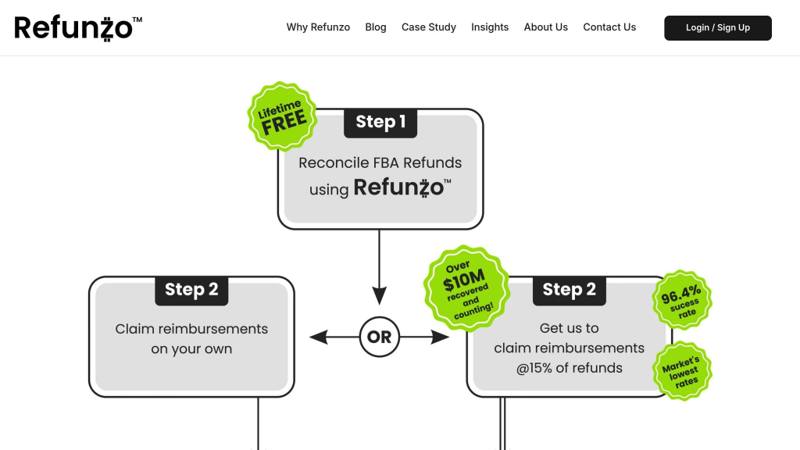
Refunzo offers automated 21-point reconciliation checks and charges a capped commission of 15% (up to $5,000), making it an affordable option for larger sellers. It also supports international marketplaces and prioritizes secure data handling. That is a more cost-effective structure than the managed services that typically charge uncapped commissions of 25–30%.
For the best results, consider combining automated tools with occasional manual reviews to ensure your data remains accurate and nothing slips through the cracks.
Reducing Future Inventory Loss
Improving FBA Shipping Practices
Fine-tuning your FBA shipping approach can help cut down on inventory losses. Use Amazon-partnered carriers to take advantage of discounted rates and pack items smartly with lightweight but sturdy materials. Key packaging tips include:
Use boxes that meet Amazon's guidelines.
Ensure FNSKU barcodes are easy to scan.
Reduce space to lower dimensional weight costs.
Apply proper labels to each product unit.
For larger-scale operations, consider spreading inventory across multiple fulfillment centers to minimize risks and expenses. Pair these shipping practices with consistent inventory tracking for better results.
Setting Up Inventory Alerts
Amazon's Inventory Performance Dashboard in Seller Central lets you set up tailored alerts to detect potential issues early, allowing you to act quickly to avoid losses.
Alert Type | Check Frequency | Purpose |
|---|---|---|
Inventory Performance | Daily | Monitor overall inventory health |
Restock Inventory | Weekly | Identify when to reorder stock |
Inventory Health | Bi-weekly | Assess stock conditions and turnover |
"Replenishment alerts eliminate the guesswork, automatically reminding you when it's time to restock, so you don't have to worry about missing important updates." - BetterWorldProducts.org
Gold bell icons highlight alerts that are below the threshold, while red bells signal urgent issues needing immediate attention.
Strengthening Inventory Control
Alerts help you spot problems early, but stronger inventory control measures are key for maintaining long-term stability. By combining regular inventory reviews with advanced strategies, you can better protect your stock.
"Owners of small and emerging businesses would be stunned to see how much help they can get and money they can save by wisely managing their inventory."
Here are some essential steps for better control:
Keep inventory management and accounting systems separate.
Assign unique storage areas for similar items to avoid mix-ups.
Use scalable tools to manage inventory efficiently as your business grows.
Track product lifecycles to stay on top of changes or trends.
Design control plans that focus on your most critical stock and include detailed shipment reviews. This ensures smoother inventory management and fewer disruptions throughout your operations.
Conclusion
Taking prompt, organized steps is key to recovering lost FBA inventory reimbursements. With Amazon's updated 60-day claim window starting November 1, 2024, acting quickly is more important than ever.
Experts suggest that Amazon's auto-reimbursement system may leave up to 40% of claims unresolved, which could translate to lost revenue if not addressed. Third-party services have proven effective in closing this gap. Specialist reimbursement services have achieved a 63% success rate on claims that were initially denied.
This insight highlights the importance of acting fast and staying informed. Keep thorough, up-to-date records and audit your inventory regularly to catch discrepancies early. Neglecting this process could cost as much as 3% of your annual gross sales.
Here’s a quick summary of steps to streamline your recovery process:
Action Item | Timing | Impact |
|---|---|---|
Inventory Audits | Monthly | Detects issues early |
Documentation Review | Within 15-60 days | Confirms claim eligibility |
Reimbursement Monitoring | Weekly | Tracks claim progress |