
Amazon FBA Fee Errors: Detection and Resolution Guide


Amazon FBA fee errors can quietly eat into your profits, costing you 1–3% of your annual revenue. For a $500,000 business, that’s $5,000–$15,000 in avoidable losses. These errors often go unnoticed but can be fixed with the right approach.
Common FBA Fee Errors
Storage Fee Issues: Miscalculated fees due to incorrect product dimensions or storage durations.
Weight and Size Discrepancies: Outdated or wrong measurements leading to overcharges.
Return Processing Problems: Missed refunds or incorrect return charges.
How to Fix Them
Check Reports: Review Amazon’s Fee Preview and Reimbursement Reports.
Use Tools: Refunzo automates error detection.
Submit Claims: File reimbursement requests with Amazon for overcharges.
Key Steps
Monitor fees weekly.
Audit monthly using tools or manual checks.
File claims promptly (Amazon’s claim window is 60–120 days).
By staying proactive, you can recover lost revenue and protect your bottom line.
Analyze Amazon FBA Errors and Request Reimbursements
Finding Common FBA Fee Errors
Storage Fee Mistakes
Keep an eye on your monthly storage fee statements to spot unusual charges. Watch for things like unexpected seasonal spikes, wrong storage tier assignments, or duplicate charges. Sometimes, Amazon calculates storage fees based on incorrect dimensions or time frames. This can lead to standard-sized items being billed as oversized, which can drive up your costs unnecessarily.
Weight and Size Fee Errors
Once you've checked your storage fees, shift your focus to weight and size discrepancies. These errors can inflate fulfillment costs when products are misclassified or measured incorrectly. To catch these issues, compare your product specifications in Seller Central with the Fee Preview report.
Here are some common weight and size fee errors:
Error Type | Impact | Detection Method |
|---|---|---|
Size Tier Misclassification | Higher fees due to misclassification | Review the Fee Preview Report |
Weight Measurement Errors | Increased shipping fees | Verify details in Seller Central |
Dimension Inaccuracies | Wrong storage tier assignments | Physically verify dimensions and records |
Refund Processing Errors
Refund processing errors can also add to your expenses. To ensure accuracy, follow these steps:
Cross-check the Transaction View and FBA Customer Returns reports to confirm refunds align with actual returns.
Make sure refunds aren't issued before the item is received.
Verify that every returned item is credited. If you find any discrepancies, reach out to Amazon Support within 30 days.
Use the Amazon Reimbursement Report to monitor refund transactions and quickly address any issues. If manual tracking feels overwhelming, Refunzo can help. It automatically scans for fee errors and are especially handy given Amazon's limited claim filing windows (60 days for fulfillment center claims and 60–120 days for customer returns).
Fee Error Detection Methods
Amazon Report Analysis
Regularly reviewing Amazon's built-in reports can help identify FBA fee errors. For instance, the Amazon Reimbursement Report provides details on processed reimbursements, including types, quantities, and amounts.
To get the most out of these reports:
Export and analyze Fee Preview Reports monthly.
Compare the Reimbursement Report with your inventory records to find discrepancies.
For thorough fee error reviews, combine these insights with both automated tools and manual checks.
Third-Party Tools and Refunzo
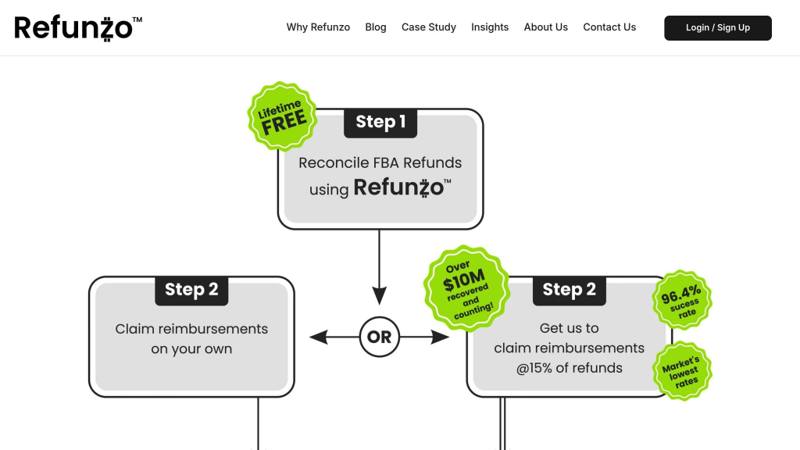
If report analysis doesn’t cover everything, automated tools can offer additional oversight.
Tool | Success Rate | Key Features | Trust Score |
|---|---|---|---|
Refunzo | N/A | 21-point reconciliation | N/A |
Refunzo is particularly notable for its lifetime free reconciliation service. It performs a 21-point reconciliation, generates detailed reports, and offers optional reimbursement claim assistance - all without any upfront costs.
Manual Fee Auditing
Manual checks are a great way to catch issues that automated tools might overlook. Here are some areas to focus on:
Weight and Dimension Verification: Ensure your product specifications align with Amazon's recorded measurements.
Storage Duration Tracking: Keep an eye on inventory age to avoid unnecessary long-term storage fees.
Package Optimization: Review packaging to confirm products fall into the appropriate size tiers.
One seller, Kareem R., managed to recover between $2,000 and $3,000 through manual auditing alone.
"Refunzo continuously audits your Amazon FBA transactions, identifying FBA discrepancies and filing claims for reimbursement on your behalf."
Combining these methods ensures a well-rounded approach to resolving FBA fee errors effectively.
Getting Fee Reimbursements
Amazon Reimbursement Rules
After identifying discrepancies, wait about 30-45 days. This period allows Amazon to make any automatic corrections. In the meantime, gather the necessary documentation, such as inventory reports, shipping records, and purchase orders, to confirm the discrepancies. These steps lay the groundwork for submitting your claim.
How to Submit Claims
In Seller Central, go to Help > Contact Us > Selling on Amazon > FBA Issue.
Select FBA inventory discrepancies and reimbursement.
Upload all required documents.
Provide a clear explanation of the fee discrepancies, including order IDs and transaction details.
Tips for Claim Approval
Submitting accurate claims is key to recovering lost revenue. Once your claim is submitted, follow these best practices to improve your chances of approval:
Maintain detailed records of inventory and transactions.
Ensure your documentation supports each discrepancy.
If you’re filing multiple claims, organize your evidence to make the process smoother.
Amazon’s reimbursement policies can change often, so it’s important to stay up to date. For extra help, tools like Refunzo can assist with FBA reconciliation checks and claim submissions.
Conclusion
Key Takeaways
Detecting and fixing FBA fee errors can have a big impact on your bottom line. These errors typically account for 1%–3% of annual revenue. To stay on top of this, focus on:
Storage Fees: Regularly check your storage charges for accuracy.
Weight and Dimensions: Ensure product measurements are correct to avoid overcharges.
Refunds: Keep track of returns and make sure all fee adjustments are processed.
Records: Maintain detailed documentation to support your claims.
These areas should form the foundation of your audit routine.
Steps to Take
Here’s how to put this into action:
Weekly Fee Checks
Go through your FBA fee reports every week, paying close attention to discrepancies in your best-selling products.
Monthly Reviews
Use tools like Refunzo’s 21-point reconciliation system to catch errors during a monthly audit.
Quarterly Reviews
Dive deeper every quarter. Look at storage fees, product measurements, refund accuracy, and past transactions to catch anything you might have missed.