
How to Download Amazon FBA Transaction Reports


Want to ensure you're not losing money as an Amazon FBA seller? Start by downloading your FBA transaction reports. These reports help you track inventory, verify payments, claim reimbursements, and spot financial discrepancies. Here's a quick guide to get started:
Log in to Seller Central: Go to sellercentral.amazon.com, enter your login details, and enable two-factor authentication for security.
Access Reports: Navigate to the Reports tab, select Payments, and choose either Transaction View or Date Range Reports.
Download Data: Pick a date range, choose CSV or PDF format, and save the file using a clear naming system (e.g.,
FBA_Transactions_Apr2025).Review Key Data: Check shipments, inventory, fees, refunds, and returns to identify errors or reimbursement opportunities.
Automate the Process: Tools like Refunzo can scan reports, flag discrepancies, and simplify claims for reimbursements.
Pro Tip: Stay organized by downloading reports regularly (weekly, monthly, or quarterly) and using automation tools to save time and recover funds efficiently.
How to Download Your Payment Report in Amazon Seller ...
Login to Amazon Seller Central

To access your FBA transaction reports, start by securely logging into your Amazon Seller Central account. Here's a straightforward guide to help you get there quickly.
Enter Your Login Details
Head to sellercentral.amazon.com using your preferred web browser. Keep these security tips in mind:
Use a secure internet connection.
Enable two-factor authentication for added protection.
Ensure your browser is up-to-date.
Clear your browser cache if you encounter any issues.
Enter your registered email address and password. If you’ve enabled two-factor authentication, input the verification code sent to your device.
Once logged in, you’ll need to locate the Reports section.
Find the Reports Menu
Here’s how to navigate to the right place:
Hover over the Reports tab in the main navigation bar.
Choose Payments from the dropdown menu.
Select either Transaction View or Date Range Reports to access the data you need.
Quick Tip: Bookmark the Reports page in your browser for easy access later. This can save time if you frequently download reports for reconciliation.
If you’re using Refunzo for automated reconciliation, you’ll only need to connect your Amazon account once through their secure system. This makes future access to your transaction data seamless and simplifies the reconciliation process.
Up next, find out how to extract the specific data you need from these reports.
Get Your Transaction Reports
Easily generate and download your transaction data for FBA reconciliation by selecting the right report.
Choose a Date Range
Once your report is ready, set your start and end dates (MM/DD/YYYY) using the calendar tool. For the most accurate reconciliation, download reports covering full calendar months.
Save Your Reports
Pick a format that suits your needs: CSV for in-depth analysis or PDF for a quick summary.
Use a consistent naming system, like: FBA_Transactions_[Month]_[Year].
Store the file in a dedicated folder, back it up, and double-check that the report is complete.
After saving, go through key data points in the report to confirm everything is accurate.
Read Your Transaction Data
Take a close look at your transaction reports to identify potential reimbursement opportunities and ensure your data is ready for reconciliation.
Key Data Points to Review
Focus on these critical areas:
Shipments: Look for damaged items and review stock counts to identify any transit-related damage.
Inventory: Compare stock levels after shipments to spot any discrepancies.
Returns: Check the condition of returned items and how they were processed.
Payments: Review FBA fees and charges to identify any overcharges.
Refunds: Confirm that customer return credits are accurate.
Once you've reviewed these areas, it's time to organize your data for smoother reconciliation.
Organize Data by Time Period
Structure your reports by month, group them quarterly for accounting purposes, and archive them annually. Staying organized helps you catch issues early.
For a more efficient process, Refunzo offers automated reconciliation with built-in checks to simplify your workflow.
Use Refunzo for Easy Reconciliation
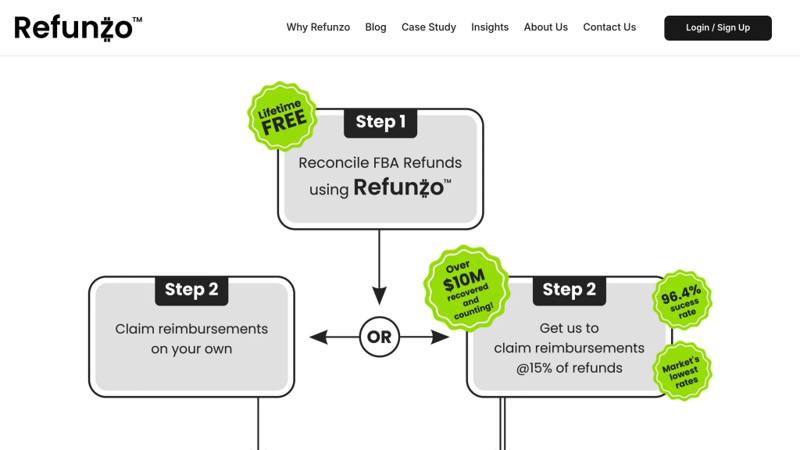
Simplify your reconciliation tasks with Refunzo's automated system. It scans your FBA data to uncover discrepancies that could lead to reimbursements.
What Refunzo Does
Refunzo's system examines various aspects of your FBA transactions to ensure accuracy:
Shipment Analysis: Confirms stock counts and flags any damaged items during transit
Inventory Tracking: Detects mismatches in stock levels
Payment Verification: Checks FBA fees and charges for errors
Return Processing: Reviews customer returns and refund handling
With its detailed reports, Refunzo highlights exactly where Amazon may owe you money, making the claims process much smoother.
Refunzo's Process
Refunzo makes reconciliation simple with just two steps:
1. Initial Reconciliation
Link your Amazon Seller Central account to Refunzo's platform. Once connected, the system runs a 21-point check on your transactions and provides a detailed report of any issues.
2. Reimbursement Options
Review the report and decide whether to handle claims yourself or let Refunzo take care of it for a 15% fee (with a cap of $5,000).
"Each Amazon case is handled individually, ensuring every claim is checked and processed until you receive full refunds." - Refunzo
"Been using them for a while - efficient service, reasonable price and seem to constantly be finding money that Amazon owes me." - Danny
For sellers with high transaction volumes, Refunzo's automated system saves significant time and ensures every discrepancy is addressed. It continuously monitors your account to catch anything that might slip through.
Next, learn how to manage your reports more effectively.
Tips for Report Management
Managing reports effectively ensures accurate records and helps you identify potential reimbursement opportunities. Here’s how to keep your process efficient and organized.
Set a Download Schedule
Stick to a regular schedule for downloading reports to spot issues early and maintain thorough records.
Weekly: Download payment reports every Monday.
Monthly: Pull detailed transaction reports on the 1st of each month.
Quarterly: Review historical data for trends or discrepancies.
Organize your files with clear, consistent names (e.g., "FBA_Transactions_Apr2025") and back them up digitally and in the cloud for easy access.
Check for Errors
After setting up your download schedule, make it a habit to review your reports for potential errors.
Focus on these common problem areas:
Shipment Counts: Confirm that shipment numbers match expectations.
Fee Accuracy: Double-check storage and fulfillment charges.
Returns and Refunds: Track customer returns and ensure refunds are processed.
Inventory Adjustments: Look for claims related to warehouse damage or losses.
Pay closer attention during busy times, like Q4, when transaction volumes spike and errors are more likely.
Use Time-Saving Tools
Manually reviewing reports can be slow and prone to mistakes. Tools like Refunzo simplify the process by automating over 20 checks, flagging discrepancies, and generating reimbursement reports.
"Each Amazon case is handled individually, ensuring every claim is checked and processed until you receive full refunds." - Refunzo
"Been using them for a while - efficient service, reasonable price and seem to constantly be finding money that Amazon owes me." - Danny
Using automation tools like Refunzo can save time and help you recover funds more effectively.
Wrapping Up
Downloading and managing FBA transaction reports is crucial for keeping accurate records and securing timely reimbursements. Sorting through these reports manually can take hours, but tools like Refunzo simplify the process by automating reconciliation and spotting reimbursable issues.
"They have done a great job finding money which was owed to me by Amazon due to lost and damaged inventory. Their fees are reasonable especially considering the fact that they have literally recovered thousands of dollars on my behalf." - Rob C.
To stay on top of your FBA reports, follow these key steps:
Set up a consistent schedule for downloading reports.
Organize files systematically for quick access.
Use automation tools to flag potential claims.